How to post or comment on Searchfunder

August 24, 2019
by Karen Spencer from Stanford University - Graduate School of Business in Honolulu, HI, USA
Today's the day, you're attending a search fund conference, networking in a room filled with investors, attorneys, and other searchers all interested in the exciting possibilities of search. A stranger walks up to you and immediately says, "Hey, I just got here. I need $$$. Got some?" You shrug off that person and then spend some more quality time networking. Your having an interesting conversation that's helping you resolve an important issue for you, when another person interrupts with, "Hey, are you interested in a brand new timeshare in Des Moines?" Then, every time someone asks a question, another person chimes up, "Bitcoin!"
You don't want to be at that conference -- neither do we.
Our mission is to have a vibrant and helpful culture where community members share their experience, best practices, tips, industry news and knowledge. Together, we can make the grinding process of learning about search funds, searching for a business to buy and operating that business more efficient -- making it a lot less lonely.
You'll meet real people on Searchfunder with whom you can network. In many ways, it's like a search fund conference at your fingertips. Thus, it's important that you build your credibility within the community. To that end, while it may seem tempting, we strongly recommend avoiding these types of posts as you start out:
- * Quick solicitations: "Hey, I just signed on to this community. I need $$$." or its close cousin, "Hello. Here I am. Give me your business."
- * Purely performative utterances like "Hi!" and "Thanks!", designed solely to achieve free access credits.
- *. Naked promotion such as repeatedly linking to the same website (most likely yours) in comments no matter the context.
- * Topics unrelated to search fund activities that hijack conversations, example, "Have you considered bitcoins?"
redactedhereredactedhereredactedhereredacted
As the community grows, we want it to continue being a welcoming, supportive and inclusive place for all.
Here's what this Tip Sheet covers:
- Step 1: Browse past posts
- Step 2: Like or Comment on a Post
- Step 3: Creating a post or post a deal
- Step 4: Be a positive contributor
- Step 5: Editing or deleting a post
Step 1: Browse past posts
We recommend first browsing posts to see what previous questions and answers have been asked and answered. There are several ways to browse through posts on Searchfunder:
1) Scroll through your news feed on your Timeline (home) page. At the bottom of interesting posts, you'll find a tag. Click that tag for other content on that topic.
2) On the main menu ► next to your profile picture under discussions, click topics of interest.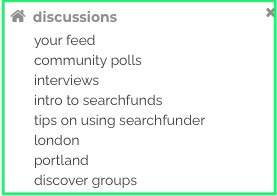
3) Use the "search users and posts" bar at the top of your page. To learn more about the search feature, click here.

Step 2: Like or Comment on a Post
If a post is helpful to you, the preferred practice is to Like the post. This quick step gives happy kudos to the person who wrote the post. Also, Liking elevates the post in the news feed. Elevated posts help to educate other searchers and also serves as a signal to the Searchfunder.com team about the topics of greatest interest to you so that we can locate additional content or resources for the community.
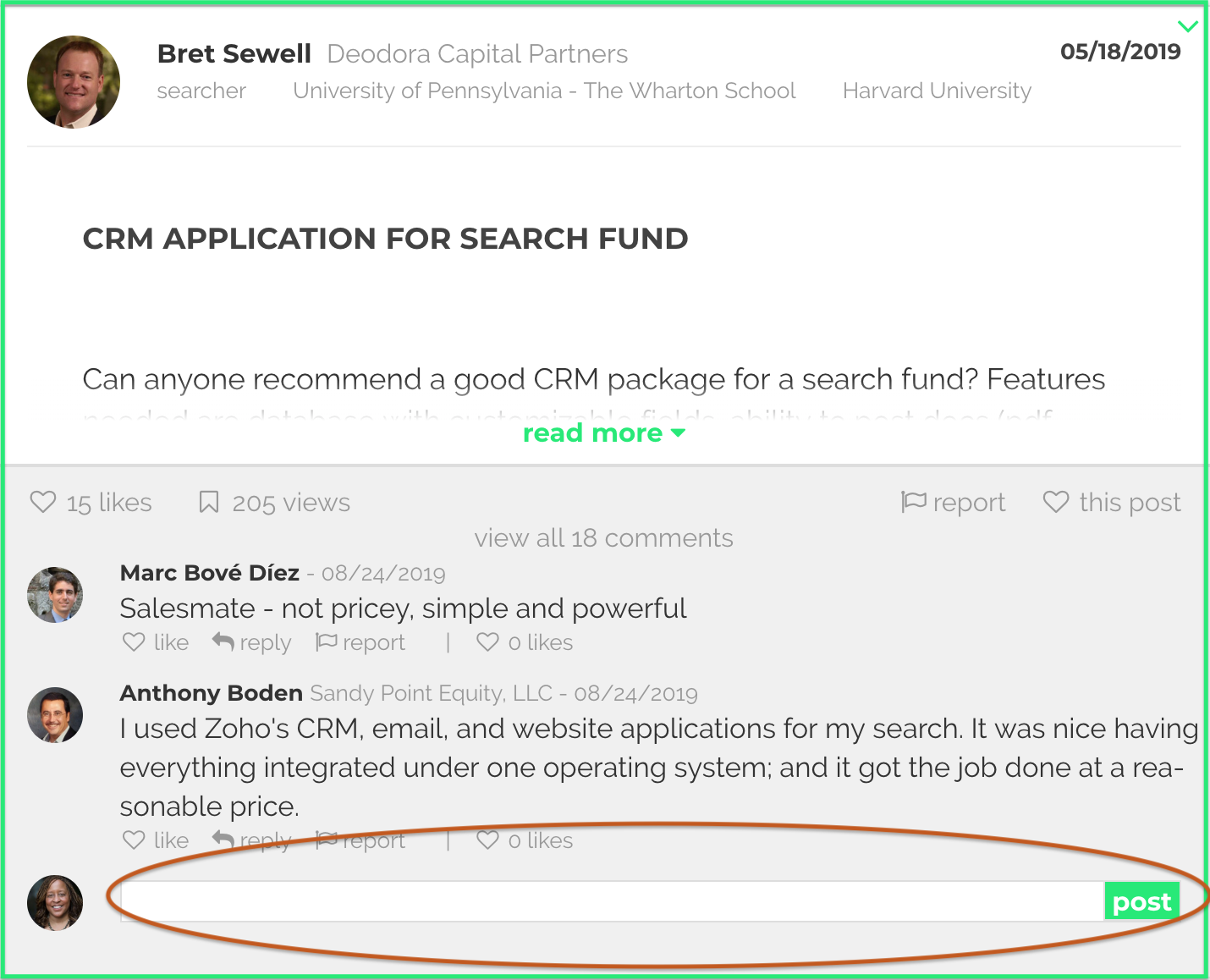
To comment on a post, click on the white space beneath the post, type your comment and then click post. The best comments tend to be congratulatory, helpful, informative and/or constructive. It's okay to disagree in a respectful manner. Our community frowns those who consistently make non-substantive comments. It's bad for your reputation and bad for the viability of the community as a whole. Click here for more info,
To tag someone in a post or comment, use the Shift-6 or ^ key. Click here for more info. Please avoid putting your contact info in comments/posts.
To report SPAM or other issues with a comment, you may click the Report button. For more info, please see here.
Step 3: Create a post, event, job or deal.
Click on the bar at the top of your feed. It's located in the center next to your middle profile picture. For additional posting options -- like inserting pictures and hyperlinks, please see Punch Up Your Posts
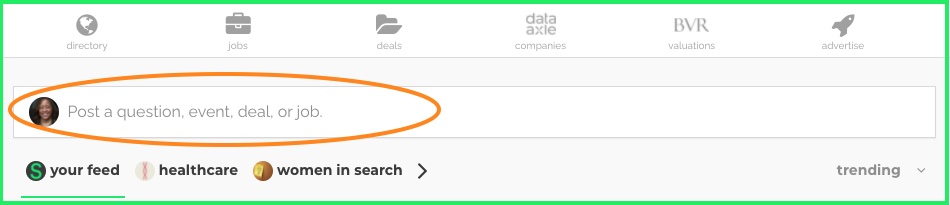
Then, select the option which best suits what you are trying to accomplish. This will route your post to the appropriate spot. You may post an event which will place it on our events calendar. Then, as your event approaches, you can either comment on your event which will place it in the feed again or do a new post under "share information."

Step 4: Be a positive contributor
Searchfunder is a community for individuals trying to do one of the hardest tasks of their careers -- search for, negotiate and purchase a company that they will then operate and grow. Although we have our terms of service, we set the bar far, far higher. (We're sure you've been on -- and perhaps quit -- a social media platform where folks are rude, snippy, snarky, self-serving, insulting, go on tirades or use profanity. Don't do that!) Please treat others like they would wish to be treated on their best day. Also, remember that what you might say in casual conversation can unintentionally come across as terse or snarky when written online. It's okay to disagree and bring new/different perspectives to a discussion. At the same time, take care that your words reflect a positive, helpful intent.
We like to think of Searchfunder as a conference in your pajamas. To that end, if you wouldn't say it at a conference full of colleagues, then it's probably best to refrain from saying it here. If you ever doubt it, don't submit it.
Here's some guidance for posting, commenting and messaging on Searchfunder:
* Respect others. Respect yourself. Respect your search fund community.
* Be kind. Be honest.
* Be generous in sharing your knowledge.
* Be giving in your listening. Listen to learn and understand, not to win.
* Ask questions.
* Try your best to pay it forward.
redacted
Building a supportive community requires positive behavior by all of our members. If your post(s) or comment(s) receives too many reports, your post or comment may be automatically removed and/or your account suspended. Your account may be suspended temporarily or permanently at our sole discretion. If, in the rare situation, your account is reinstated, you must re-register and begin the process of earning free access credits anew.
We evaluate conduct based on both the written guidance, the intent of the guidance and the spirit of the community. We do not provide warnings. We do not have an escalation process. If you're reading these guidelines trying to figure out how to abide by the minimum requirements necessary to maintain membership, you're likely not appreciating the unique spirit of our community and may be better suited for another platform. If you "get it," we are delighted to have you aboard and will do our best to help you in any way that we can.
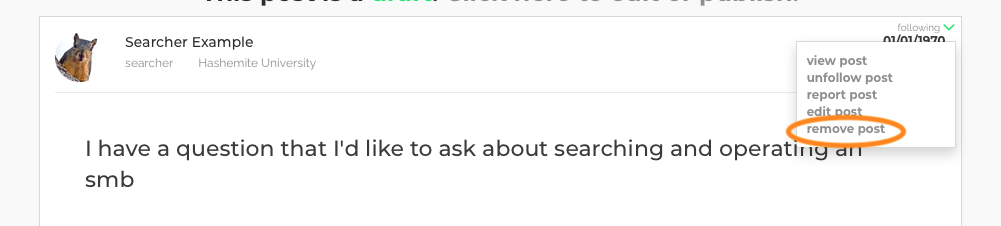
Step 5: Edit or remove a post
1) Locate your post
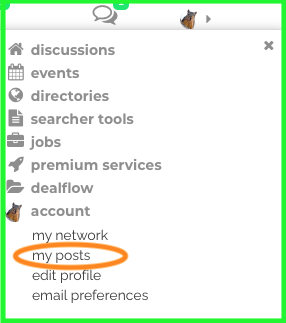
Two ways to locate the post are by (i) searching for it in the search bar or (ii) clicking on the main menu ► next to your profile pic and then clicking my account and then my posts.
2) Click the down wedge menu
redacted
from The University of Georgia in Atlanta, GA, USA
from Stanford University in Honolulu, HI, USA